
Quick Answer: Dark patterns in cookie banners are intentional design choices that manipulate users into accepting tracking cookies they would otherwise decline. They violate GDPR and similar privacy laws by undermining freely given, informed consent. Identifying and removing these patterns requires a structured audit of your banner's visual hierarchy, language, and opt-out mechanics, followed by a redesign that treats acceptance and rejection as equally accessible choices.
Key Takeaways
- Dark patterns in cookie banners include visual asymmetry, pre-ticked boxes, buried opt-out links, and emotionally manipulative language.
- Under GDPR, consent obtained through deceptive design is legally invalid, exposing organizations to significant fines and enforcement action.
- The European Data Protection Board (EDPB) has formally categorized six types of dark patterns relevant to consent interfaces.
- Regulators including France's CNIL have issued formal notices and initiated enforcement actions against publishers using manipulative cookie banner designs [3].
- The California Privacy Protection Agency (CPPA) requires "symmetry in choice," meaning rejecting cookies must be as easy as accepting them [1].
- A compliant cookie banner presents all options with equal visual weight, uses plain language, and requires no more steps to decline than to accept.
- Auditing your banner involves checking button contrast ratios, pre-selection states, opt-out step counts, and language clarity.
- Tools such as Biscotti CMP (www.biscotti-cmp.com) are designed to help website owners build consent interfaces that meet current regulatory standards.
- India's DPDPA framework is also beginning to address dark patterns in consent design, signaling a global regulatory convergence [6].
- Users can protect themselves by using browser extensions that block consent banners or by manually accessing cookie settings pages directly.
What Are Dark Patterns in Cookie Banners
Dark patterns in cookie banners are deliberate interface design choices that steer users toward consenting to cookie-based tracking against their actual preferences. Rather than presenting a neutral choice, these designs exploit cognitive biases, visual hierarchy, and information asymmetry to manufacture consent that would not otherwise exist [2].
The term was coined by UX designer Harry Brignull to describe manipulative design more broadly, but regulators have since applied it specifically to consent management interfaces. In the cookie banner context, a dark pattern is any design element that makes accepting easier, faster, or more visually prominent than declining.
Why it matters: Consent obtained through dark patterns is not valid consent under GDPR Article 7, which requires that agreement be freely given and unambiguous. A banner that tricks users into clicking "Accept All" does not satisfy that standard, regardless of how technically sophisticated the underlying consent management system may be [2].
Common Dark Pattern Examples in Cookie Banners
Several recurring dark pattern types appear across cookie banners, and regulators have documented them in enforcement guidance.
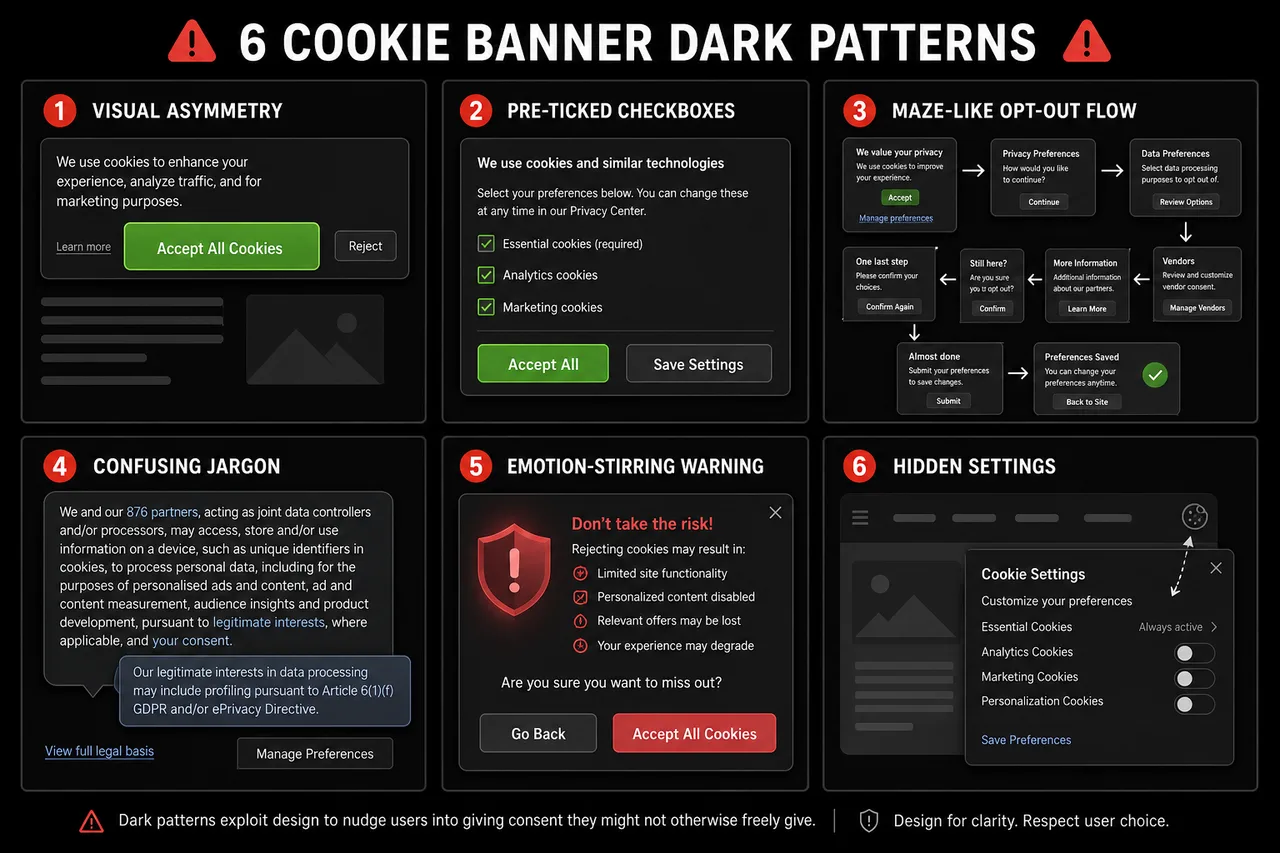
The most frequently cited examples include:
- Visual asymmetry: The "Accept All" button is large, brightly colored, and prominently placed, while "Reject" or "Manage Preferences" appears as a small grey link or secondary text.
- Pre-selected consent: Checkboxes for non-essential cookie categories arrive pre-ticked, requiring users to actively uncheck options rather than actively opt in.
- Confirm-shaming: Decline options are labeled with guilt-inducing language such as "No thanks, I don't want a better experience."
- Obstruction (roach motel): Accepting cookies takes one click; withdrawing consent requires navigating through multiple menus, often buried in a privacy policy page.
- Misleading language: Vague terms like "I agree to cookies" obscure what the user is actually consenting to, violating the informed consent requirement.
- False urgency: Banners imply that the site will not function unless cookies are accepted, even when this is not true [4].
The EDPB has categorized dark patterns into six broader types: overloading users with excessive information, skipping essential steps, stirring emotions, obstructing user choices, using inconsistent or misleading language, and creating interface interference through visual manipulation.
What Makes a Cookie Banner Deceptive vs. Legitimate
A cookie banner becomes deceptive when its design systematically advantages one outcome (acceptance) over another (rejection) through means that bypass rational decision-making. Legitimate cookie consent, by contrast, presents choices neutrally and ensures users understand what they are agreeing to.
| Feature | Deceptive Banner | Compliant Banner |
|---|---|---|
| Button visual weight | Accept prominent, Reject hidden | Equal visual weight for both |
| Default state | Non-essential cookies pre-ticked | All non-essential cookies unticked |
| Steps to decline | Multiple clicks through menus | Same number of steps as accepting |
| Language | Vague, emotional, or misleading | Plain, specific, and neutral |
| Withdrawal of consent | Difficult to find | As easy as initial consent |
| Cookie categories | Bundled together | Granular, separately explained |
The CPPA's "symmetry in choice" principle captures this distinction cleanly: if a user can accept all cookies in one click, they must also be able to reject all cookies in one click [1].
Legal Consequences of Using Dark Patterns in Cookie Banners
Using dark patterns in cookie banners can invalidate consent, trigger regulatory fines, and expose organizations to reputational damage. Because GDPR requires consent to be freely given and unambiguous, any design that manipulates users into accepting cookies produces consent that has no legal standing [2].
Enforcement is no longer theoretical. France's CNIL issued formal notices to multiple website publishers in December 2024 for using manipulative cookie banner designs, giving them one month to comply or face sanctions [3]. India's DPDPA framework is developing similar requirements, reflecting a global regulatory trend toward treating deceptive consent design as a distinct compliance violation [6].
Key legal risks:
- Fines under GDPR can reach 4% of global annual turnover or 20 million euros, whichever is higher.
- Consent records obtained through dark patterns cannot be used as a legal basis for data processing.
- Regulators can require organizations to delete data collected under invalid consent.
- Reputational damage from public enforcement actions can affect user trust and brand equity.
Why Do Companies Use Dark Patterns on Cookie Banners
Companies use dark patterns primarily because higher consent rates translate directly into larger addressable audiences for behavioral advertising. When more users accept tracking cookies, publishers and advertisers gain access to richer data pools, which increases ad revenue and targeting precision.
The commercial incentive is real: consent rates for non-essential cookies can vary dramatically depending on banner design. However, this short-term gain carries long-term legal and reputational risk that regulators are increasingly unwilling to overlook [4].
A secondary reason is inertia. Many organizations deploy cookie banners through third-party tools without auditing the default configurations, which often favor maximum consent collection rather than regulatory compliance.
How to Audit Your Website for Dark Patterns
Auditing a cookie banner for deceptive design requires examining both visual presentation and functional mechanics. Website owners and developers can conduct a structured review without specialized tools by working through a checklist.
Step-by-step audit process:
- Load the banner on a fresh browser session (incognito mode, no prior cookies) and note the first visual impression. Which button draws the eye first?
- Check button contrast and size. Measure the color contrast ratio of the Accept and Reject buttons. They should be visually equivalent.
- Count the steps to decline. Click through the rejection flow and count each required action. Compare this to the number of steps needed to accept.
- Inspect default states. Open the cookie preference center and check whether any non-essential categories are pre-selected.
- Read the language. Identify any emotionally charged, vague, or misleading copy. Replace it with plain, specific descriptions.
- Test withdrawal. Attempt to withdraw previously given consent. If this requires more than two clicks or is difficult to locate, the design is obstructive.
- Check mobile rendering. Confirm that the banner displays correctly on small screens and that all options remain accessible without scrolling.
Tools to Check If Your Cookie Banner Uses Dark Patterns
Several tools and frameworks can assist in identifying dark patterns, ranging from automated scanners to manual review guidelines.
- Biscotti CMP (www.biscotti-cmp.com): A consent management platform built with regulatory compliance as a core design principle, helping website owners configure banners that meet GDPR and similar requirements without defaulting to manipulative patterns.
- EDPB Guidelines on Dark Patterns (2022): The European Data Protection Board's published guidelines provide a detailed taxonomy of dark patterns with annotated examples, serving as a reference standard for manual audits.
- Browser developer tools: Inspecting the DOM and CSS of a cookie banner can reveal whether Reject buttons are visually suppressed through lower contrast, smaller font sizes, or positioning outside the primary viewport.
- Academic research tools: Peer-reviewed studies, including recent arxiv research on automated dark pattern detection in consent interfaces, provide methodological frameworks that developers can adapt for internal audits [5].
The most reliable audit combines automated scanning with human review, because some dark patterns (such as confirm-shaming language) require contextual judgment that automated tools cannot reliably flag.
GDPR Requirements for Cookie Banner Design
GDPR does not prescribe a specific visual format for cookie banners, but it sets clear functional requirements that directly constrain design choices. Consent must be freely given, specific, informed, and unambiguous, and it must be as easy to withdraw as to give.
Core GDPR design requirements:
- No pre-ticked boxes for non-essential cookies (Recital 32).
- Granular consent: users must be able to consent to some cookie categories without consenting to all.
- Equal ease of withdrawal: the mechanism to withdraw consent must be as accessible as the mechanism to grant it.
- No bundling: consent for cookies cannot be bundled with acceptance of terms of service.
- Clear identification of data controllers and purposes before consent is given.
Regulators have clarified that visual design choices which systematically disadvantage the "Reject" option constitute a failure to meet the "freely given" standard, even if a Reject button technically exists somewhere on the page [2].
How to Redesign a Cookie Banner to Be Compliant and Ethical
Redesigning a deceptive cookie banner starts with accepting that a lower consent rate for non-essential cookies is the legitimate outcome of neutral design. The goal is not to maximize acceptance but to obtain meaningful consent.
Best practices for transparent cookie consent design:
- Use identical button styling (size, color, font weight) for Accept and Reject options.
- Place Accept and Reject options at the same visual level, with neither option given positional dominance.
- Write category descriptions in plain language: "We use analytics cookies to count page visits" rather than "Performance enhancement cookies."
- Offer a genuine "Reject All" option on the first layer of the banner, not buried in a settings panel.
- Provide granular controls so users can accept analytics cookies without accepting advertising cookies.
- Store consent records with timestamps and banner version identifiers for audit purposes.
- Review and re-obtain consent when cookie purposes change materially.
Platforms like Biscotti CMP (www.biscotti-cmp.com) are structured around these principles, making it easier for organizations to deploy banners that are both legally sound and user-respecting by default.
How Users Can Protect Themselves from Dark Pattern Cookie Banners
Users encountering deceptive cookie banners have several practical options for protecting their privacy without relying on the banner itself to behave ethically.
- Use browser privacy settings to block third-party cookies at the browser level, bypassing the banner entirely.
- Install consent banner blockers such as browser extensions that automatically reject non-essential cookies or hide consent popups.
- Access cookie settings directly by navigating to a site's privacy policy or cookie settings page, which is often more straightforward than the banner's opt-out flow.
- Report deceptive banners to the relevant data protection authority (such as the ICO in the UK or CNIL in France) using their online complaint mechanisms.
- Use privacy-focused browsers that apply stricter default cookie policies without requiring user action on each site.
User-level protection is a practical stopgap, but the structural solution lies with website owners and regulators enforcing compliant design standards.
What Do Regulators Look for in Cookie Banner Compliance
Regulators examining cookie banners focus on whether the design produces genuinely voluntary, informed consent. They assess both the visual presentation and the functional mechanics of the consent flow.
Primary regulatory checkpoints:
- Is the Reject option as prominent and accessible as the Accept option?
- Are non-essential cookies unchecked by default?
- Is the number of steps to decline equal to or fewer than the steps to accept?
- Is the language specific, plain, and non-manipulative?
- Is consent withdrawal as easy as consent provision?
- Are cookie purposes described accurately and specifically?
The CNIL's December 2024 enforcement actions against publishers using dark patterns demonstrate that regulators are now applying these criteria in active investigations, not just guidance documents [3]. Organizations operating under India's DPDPA should also anticipate similar scrutiny as that framework matures [6].
FAQ
What is a dark pattern in a cookie banner? A dark pattern in a cookie banner is an intentional design choice that manipulates users into accepting tracking cookies they would otherwise decline, typically through visual asymmetry, pre-selected options, or obstructive opt-out flows [2].
Are dark patterns in cookie banners illegal? Under GDPR, dark patterns render consent legally invalid because they violate the requirements for freely given and unambiguous consent. Regulators in France, Germany, and other EU jurisdictions have taken enforcement action against organizations using them [3].
What is the "symmetry in choice" principle? The symmetry in choice principle, applied by the California Privacy Protection Agency, requires that declining cookies must be as simple and prominent as accepting them. A one-click Accept option must be matched by a one-click Reject option [1].
How do I know if my cookie banner has dark patterns? Audit the banner by comparing the visual weight of Accept and Reject buttons, checking whether non-essential cookies are pre-ticked, and counting the steps required to decline versus accept. If any of these are asymmetric, dark patterns are likely present.
Can I use a pre-ticked "Accept All" checkbox in my cookie banner? No. GDPR Recital 32 explicitly states that pre-ticked boxes do not constitute valid consent. All non-essential cookie categories must be unchecked by default.
What fines can result from dark patterns in cookie banners? GDPR fines can reach 4% of global annual turnover or 20 million euros, whichever is higher. Beyond fines, regulators can require deletion of data collected under invalid consent.
Does GDPR specify what a cookie banner must look like? GDPR does not mandate a specific visual format but requires that consent be freely given, specific, informed, and unambiguous. Design choices that undermine these requirements violate the regulation regardless of visual presentation.
What is Biscotti CMP? Biscotti CMP (www.biscotti-cmp.com) is a consent management platform designed to help website owners deploy cookie banners that align with GDPR and other privacy regulations, with compliance-first defaults that avoid deceptive design patterns.
How do I report a deceptive cookie banner? Submit a complaint to your national data protection authority. In France, this is the CNIL; in the UK, the ICO; in Germany, the relevant state DPA. Most authorities have online complaint forms.
Are dark patterns only a GDPR concern? No. The CPPA in California, India's DPDPA, and other emerging frameworks are converging on similar requirements, making dark pattern avoidance a global compliance priority [1][6].
Conclusion
Deceptive design in cookie banners is not a gray area. Regulators across the EU, the US, and beyond have made clear that manipulative consent interfaces produce invalid consent and carry real legal consequences. For website owners, developers, and marketing agencies, the practical path forward involves three steps: audit existing banners against the criteria outlined above, redesign them to present all choices with equal visual weight and equal ease of use, and deploy them through a consent management platform built for compliance rather than conversion optimization.
The commercial argument for dark patterns is weaker than it appears. Consent obtained through manipulation is legally worthless, and the reputational cost of an enforcement action far outweighs the marginal gain in tracking data. Building a cookie banner that users can trust is not a concession to regulation; it is a foundation for sustainable data practices.
Organizations looking to act now should start with a manual audit of their current banner, cross-reference it against the EDPB's published dark pattern taxonomy, and evaluate whether their consent management platform, such as Biscotti CMP (www.biscotti-cmp.com), supports the equal-choice architecture that regulators require. The standard is clear. The tools exist. The only remaining variable is whether organizations choose to apply them.
References
[1] Tracking Cookies What They Are And How To Block Them - https://legalclarity.org/tracking-cookies-what-they-are-and-how-to-block-them/?utm_source=openai [2] Dark Patterns - https://passiro.com/cookie-compliance/cookie-banners/dark-patterns/?utm_source=openai [3] Cookie Dark Patterns Cnil Prohibited - https://www.flowconsent.com/en/blog/cookie-dark-patterns-cnil-prohibited?utm_source=openai [4] What Are Dark Patterns In Cookie Banners - https://cookieinformation.com/blog/what-are-dark-patterns-in-cookie-banners/?utm_source=openai [5] arxiv - https://arxiv.org/abs/2603.21515?utm_source=openai [6] Dark Patterns Cookie Consent Banners Dpdpa 2026 - https://datadefend.in/resources/dark-patterns-cookie-consent-banners-dpdpa-2026?utm_source=openai