
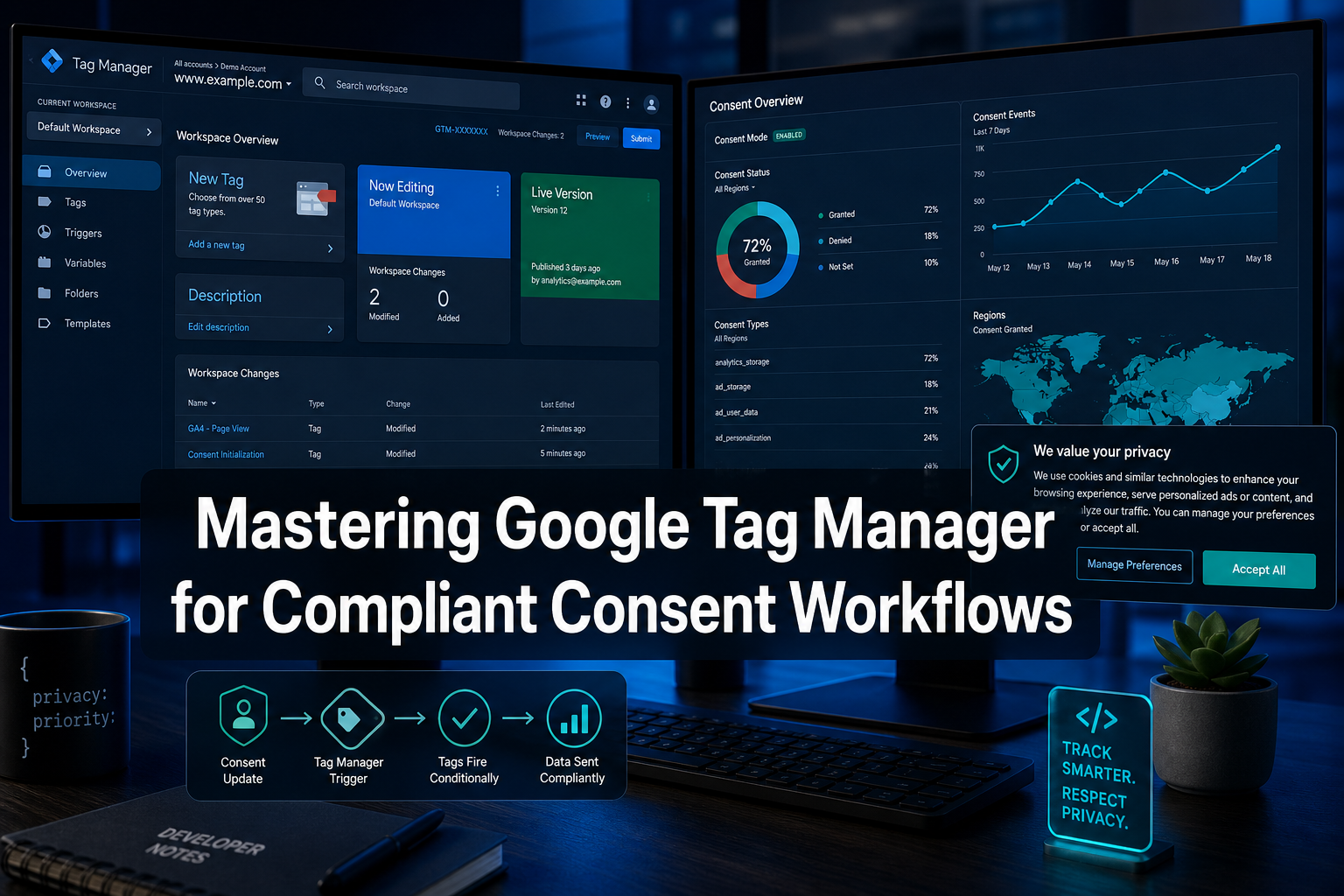
Quick Answer: Mastering Google Tag Manager for compliant consent workflows requires configuring Google's Consent Mode v2, connecting a certified Consent Management Platform, and using GTM's built-in consent initialization triggers to block tags until users grant permission. Done correctly, this setup satisfies GDPR, CCPA, and Google's EU User Consent Policy simultaneously while preserving meaningful measurement data.
Key Takeaways
- Consent Mode v2 introduces two new parameters,
ad_user_dataandad_personalization, giving advertisers more granular control beyond the originalad_storageandanalytics_storagesignals [1] - GTM's Consent Initialization trigger fires before all other triggers, ensuring no tags execute before consent state is established [2]
- Tags with built-in consent checks will send anonymized pings (not cookies) when consent is denied, enabling statistical data modeling [3]
- Failing to implement consent correctly in GTM can expose organizations to regulatory fines and loss of Google ad personalization features [1]
- The GTM Consent Overview page allows bulk editing of consent settings across an entire container, reducing configuration errors [2]
- A certified CMP such as Biscotti CMP can integrate directly with GTM to automate consent signal delivery
- Testing consent workflows in GTM Preview Mode before publishing is non-negotiable for catching misconfigured tag firing rules
- Ecommerce sites face heightened risk because purchase and remarketing tags are among the most consent-sensitive tag types
What Is Google Tag Manager and How Does It Work with Consent
Google Tag Manager (GTM) is a tag management system that lets website owners deploy and manage JavaScript snippets (tags) without modifying site code directly. In the context of consent, GTM acts as the enforcement layer: it receives consent signals from a Consent Management Platform and uses those signals to decide which tags are permitted to fire.
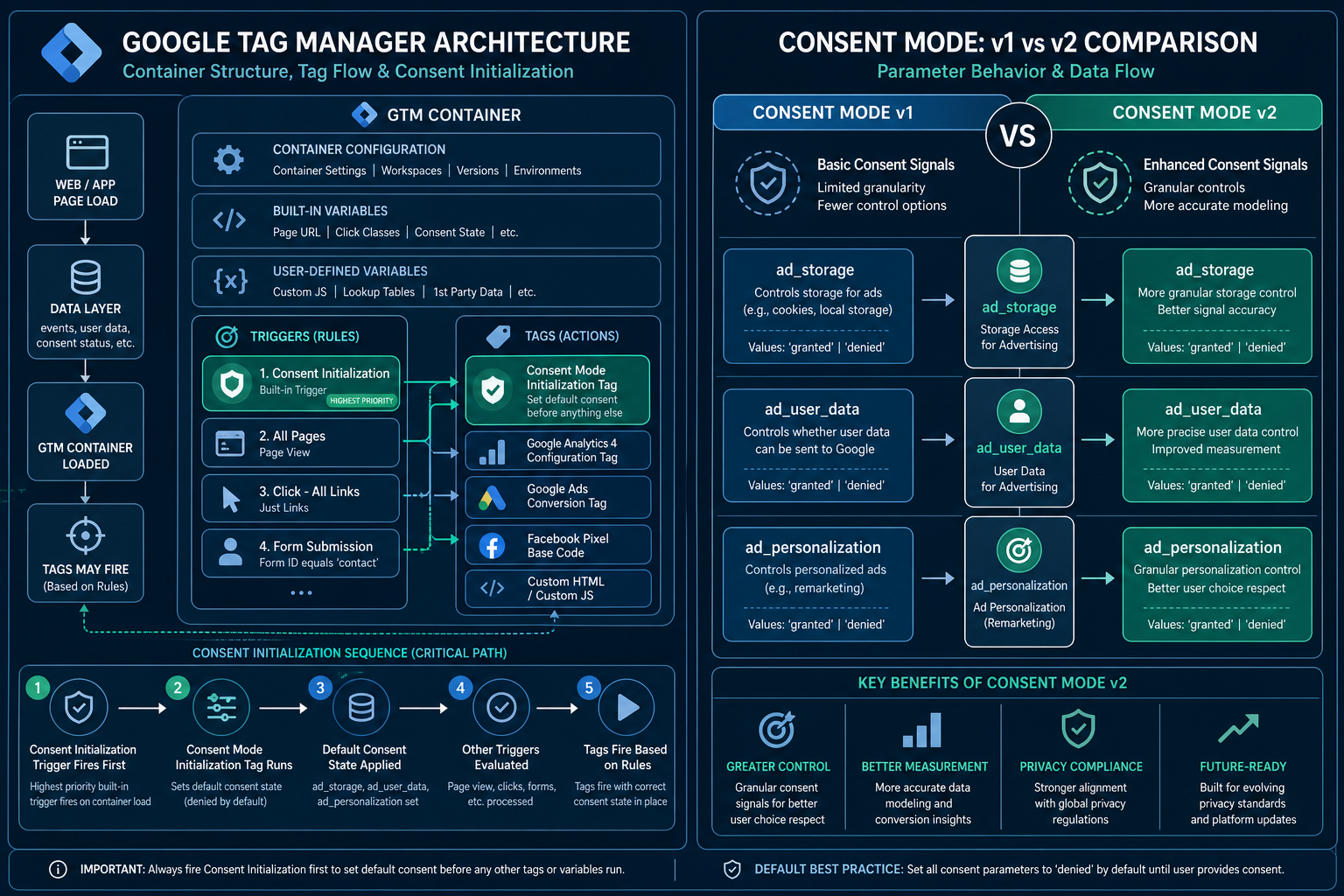
When a user lands on a page, the following sequence occurs:
- The GTM container loads
- The Consent Initialization trigger fires, setting the initial consent state before any other tag executes [2]
- The CMP banner appears and captures the user's choice
- Consent signals are pushed to GTM's data layer
- Tags with consent requirements check the current state and fire or remain blocked accordingly
This architecture means GTM itself does not collect consent, it reads and enforces it. The CMP is responsible for capturing and storing user preferences.
What Is the Difference Between Consent Mode v1 and v2
Consent Mode v2 is a significant expansion of the original framework, and understanding the distinction is essential for anyone focused on mastering Google Tag Manager for compliant consent workflows.
Consent Mode v1 covered two parameters:
ad_storage: controls advertising cookiesanalytics_storage: controls analytics cookies
Consent Mode v2 adds two additional parameters [1]:
ad_user_data: controls whether user data may be sent to Google for advertising purposesad_personalization: controls whether data may be used for personalized advertising
The practical consequence is that advertisers who only implemented v1 are no longer fully compliant with Google's EU User Consent Policy. As of March 2024, Google required v2 adoption for EEA traffic to maintain access to audience-based features and conversion modeling. Sites still running v1 configurations should treat upgrading as an urgent remediation task, not an optional enhancement.
How to Set Up Consent Mode in Google Tag Manager
Setting up Consent Mode in GTM is a structured process. Each step builds on the previous one, and skipping any step typically produces silent failures that are difficult to diagnose later.
Step 1: Choose and install a compatible CMP Select a CMP that natively supports GTM integration and Consent Mode v2. Biscotti CMP provides a GTM-native integration that handles consent signal injection automatically.
Step 2: Configure the Consent Initialization trigger
In GTM, create a tag that sets default consent states using gtag('consent', 'default', {...}). Assign it the Consent Initialization trigger so it fires before everything else [2].
Step 3: Set conservative defaults
Default all consent parameters to 'denied' for EEA users. This ensures no data is collected before the user makes a choice.
Step 4: Push consent updates via the data layer
When the user accepts or rejects, the CMP should push a gtag('consent', 'update', {...}) call. GTM reads this and adjusts tag behavior in real time.
Step 5: Verify built-in consent checks on Google tags Google Ads, GA4, and Floodlight tags include built-in consent checks. Confirm these are enabled in the tag's Advanced Settings within GTM [3].
Step 6: Use the Consent Overview page GTM's Consent Overview page displays every tag and its consent configuration in one view, making it straightforward to identify unconfigured tags and apply bulk edits [2].
How to Make GTM Compliant with GDPR and CCPA
Compliance with GDPR and CCPA through GTM requires addressing both technical configuration and legal accountability. GTM configuration handles the technical enforcement; legal obligations require organizational policies that GTM alone cannot fulfill.
For GDPR (EEA users):
- Implement Consent Mode v2 with
'denied'defaults before consent is given - Ensure the CMP records and stores consent with timestamps and version numbers
- Honor withdrawal of consent by re-triggering tag blocking when users opt out
For CCPA (California users):
- Provide a "Do Not Sell or Share My Personal Information" mechanism
- Map GTM tags that share data with third parties to a CCPA opt-out signal
- Note that CCPA operates on an opt-out model, unlike GDPR's opt-in requirement
A 2023 research paper published on arXiv identified specific instances where GTM implementations shared personal data without adequate consent, highlighting that misconfigured containers, not GTM itself, are typically the source of legal exposure [4].
Common mistake: Applying GDPR consent logic globally instead of geo-targeting it. Serving a hard consent gate to U.S. users where it is not legally required creates unnecessary friction without compliance benefit.
Best Consent Management Platform to Integrate with GTM
The right CMP for GTM integration is one that supports Consent Mode v2, the IAB Transparency and Consent Framework (TCF) v2.0, and offers a native GTM tag or data layer integration [3].
Biscotti CMP is designed specifically for GTM-based deployments, providing automatic consent signal injection into the data layer and pre-built GTM tag templates. This removes the need for manual gtag scripting and reduces the risk of misconfiguration. For organizations managing multiple GTM containers across different domains, a CMP with multi-property support and centralized consent logging is particularly valuable.
When evaluating any CMP, verify:
- Native support for all four Consent Mode v2 parameters
- TCF v2.0 certification for EEA compliance
- Audit log capabilities for demonstrating consent records to regulators
- Geo-targeting to serve different consent experiences by jurisdiction
How to Block Tags Until a User Consents in GTM
Tags can be blocked in GTM through two complementary mechanisms: built-in consent checks and trigger conditions.
Built-in consent checks are available on Google's own tags (GA4, Google Ads Conversion Tracking, etc.). When enabled, the tag will not fire, or will fire in a restricted, cookieless mode, based on the current consent state [3].
Trigger-based blocking applies to third-party tags that lack built-in consent logic. The approach:
- Create a custom event trigger that fires only after a specific consent-granted data layer event
- Add an exception trigger that fires on page load to block the tag by default
- Use GTM's tag sequencing or trigger groups to enforce the correct firing order
For tags that must never fire without explicit consent (for example, remarketing pixels or session recording tools), trigger-based blocking is the more reliable method because it does not depend on the tag vendor's internal consent implementation.
What Happens If You Don't Implement Consent in Google Tag Manager
Skipping consent implementation in GTM carries consequences across three categories: regulatory, commercial, and technical.
Regulatory: GDPR fines can reach 4% of global annual turnover or 20 million euros, whichever is higher. CCPA penalties are assessed per violation. Research has documented real-world GTM deployments that transmitted personal data without consent, creating clear legal exposure [4].
Commercial: Google requires consent signals for EEA users to enable ad personalization and conversion modeling. Without Consent Mode v2, advertisers lose access to audience targeting features and see degraded attribution data [1].
Technical: Without consent mode defaults, tags fire immediately on page load for all users, including those in jurisdictions where this is prohibited. This is not a gray area, it is a violation of Google's own EU User Consent Policy [1].
"Tags with built-in consent checks will not store cookies when consent is denied, but may send anonymized pings to allow for data modeling.", Google Tag Manager documentation [3]
Can You Use Google Tag Manager Without a Consent Banner
GTM can technically be deployed without a consent banner, but doing so is legally permissible only in specific, narrow circumstances.
A consent banner is not required if:
- The site serves no users in the EEA, UK, or other consent-law jurisdictions
- All tags deployed collect no personal data and set no non-essential cookies
- The site uses only strictly necessary cookies (for example, session authentication)
For virtually all sites running analytics, advertising, or personalization tags, a consent banner is legally required for EEA traffic. Operating GTM without one while running GA4 or Google Ads tags constitutes a violation of GDPR's lawful basis requirements.
Edge case: A purely informational site with no tracking tags and no third-party scripts can run GTM (for example, to manage structured data or A/B testing via server-side rendering) without a consent banner, provided no personal data is processed.
How to Test Consent Workflows in GTM Before Going Live
GTM's Preview Mode is the primary testing tool. It allows developers to inspect which tags fired, which triggers activated, and what the data layer contained at each moment, all without publishing changes to live users.
Testing checklist:
- Confirm the Consent Initialization tag fires before all other tags in the Preview Mode timeline
- Simulate a consent denial and verify that non-essential tags do not fire
- Simulate a consent grant and verify that the appropriate tags fire immediately after the update event
- Check that consent state persists across page navigations (not just the landing page)
- Use browser developer tools to confirm no cookies are set before consent is granted
- Verify that the four Consent Mode v2 parameters are all present in the data layer push
For multi-jurisdiction sites, test with a VPN or geo-simulation tool to confirm that users in the EEA receive the opt-in flow while users in other regions receive the appropriate experience.
Why Isn't My Consent Mode Working in Google Tag Manager
The most common reason Consent Mode fails silently in GTM is that the default consent state is set after other tags have already fired. This happens when the Consent Initialization trigger is not used, or when the CMP script loads asynchronously after the GTM container.
Diagnostic steps:
- Open GTM Preview Mode and check the tag firing order in the Summary timeline
- Confirm the consent default tag fires at position 1, before DOM Ready or Window Loaded events
- Check the data layer for
gtag('consent', 'default', ...)andgtag('consent', 'update', ...)events - Verify the CMP is injecting consent signals via the data layer, not via a direct
gtagcall that bypasses GTM - On Google tags, confirm that "Enable consent overview" is checked in the tag's Advanced Settings [2]
A frequent edge case: developers configure Consent Mode correctly for desktop but forget that a separate AMP or mobile web container exists with no consent configuration at all.
Do You Need a Lawyer to Set Up GTM Consent Workflows
Technical configuration of GTM and Consent Mode does not require a lawyer. However, the legal decisions that inform that configuration, which legal basis applies, what constitutes a "legitimate interest," how to word consent notices, do benefit from qualified legal review.
Specifically, consult legal counsel for:
- Drafting the privacy policy and cookie policy referenced in the consent banner
- Determining whether legitimate interest applies to any processing activities
- Reviewing data processing agreements with tag vendors
- Assessing whether specific tag types require explicit consent under applicable law
GTM configuration implements the decisions made by legal and compliance teams. Developers should not make those substantive legal determinations unilaterally.
Google Tag Manager Consent for Ecommerce Tracking
Ecommerce sites face the most complex consent scenarios in GTM because purchase tracking, remarketing, and Customer Match tags are among the most data-intensive and legally sensitive.
Key considerations for ecommerce:
- GA4 Enhanced Ecommerce events (purchase, add_to_cart, begin_checkout) are tied to
analytics_storageconsent. If denied, these events will not fire with user identifiers attached [3] - Google Ads conversion tags require both
ad_storageandad_user_dataconsent under Consent Mode v2 [1] - Customer Match uploads require explicit consent signals before user data can be submitted to Google for audience matching [3]
- Remarketing tags depend on
ad_personalizationconsent; without it, users cannot be added to remarketing lists
For ecommerce operators, the business case for proper consent implementation is direct: without it, conversion modeling degrades, remarketing audiences shrink, and attribution data becomes unreliable. Consent Mode's anonymized ping mechanism partially compensates for denied consent by enabling statistical modeling, but it is not a substitute for actual consent [3].
How Often Should You Update Your GTM Consent Setup
GTM consent configurations require review whenever any of the following occur:
- Google releases a new version of Consent Mode or adds new parameters
- A new privacy regulation takes effect in a jurisdiction where the site operates
- New tags are added to the GTM container that process personal data
- The CMP vendor releases a major update to its GTM integration
- A data protection authority issues new guidance affecting tag-based tracking
As a baseline, a quarterly audit of the GTM Consent Overview page is a reasonable minimum for sites with active advertising and analytics stacks. High-traffic ecommerce sites or those operating across multiple jurisdictions should review more frequently.
What Is the Penalty for Non-Compliant GTM Implementation
Penalties for non-compliant GTM implementations are assessed under the applicable privacy regulation, not against GTM specifically. The platform is a tool; liability rests with the data controller (the website operator).
GDPR: Up to 20 million euros or 4% of global annual turnover, whichever is higher, for serious violations. Supervisory authorities have issued fines specifically related to unlawful cookie and tracking implementations.
CCPA/CPRA: Civil penalties of up to $7,500 per intentional violation. The California Privacy Protection Agency has authority to audit and enforce.
Google's own enforcement: Non-compliance with Google's EU User Consent Policy results in loss of ad personalization and measurement features, which is a significant commercial penalty independent of regulatory action [1].
The arXiv study on GTM privacy risks found concrete examples of personal data transmission without consent, underscoring that these are not theoretical risks [4].
FAQ
Q: What is the Consent Initialization trigger in GTM? A: It is a special GTM trigger that fires before all other triggers in the container, ensuring consent defaults are set before any tag can execute. It is essential for any tag that reads or writes consent state [2].
Q: Does Consent Mode v2 replace v1 entirely?
A: Yes. Consent Mode v2 is the current standard and adds ad_user_data and ad_personalization parameters to the original two. Sites still on v1 should upgrade to maintain Google ad feature access [1].
Q: Can GTM enforce consent for non-Google tags? A: GTM can block non-Google tags using trigger conditions and exception triggers, but those tags do not have built-in consent checks. The blocking logic must be configured manually in GTM.
Q: What is the difference between ad_storage and ad_user_data?
A: ad_storage controls whether advertising cookies are set on the user's device. ad_user_data controls whether user data (such as hashed email addresses) may be sent to Google's servers for advertising purposes [1].
Q: Is GTM Preview Mode sufficient for consent testing? A: Preview Mode is the primary tool but should be supplemented with browser developer tools to confirm no cookies are set before consent and no network requests carry personal identifiers.
Q: Does denying consent mean Google receives no data at all? A: No. When consent is denied, Google tags with built-in consent checks may still send anonymized, cookieless pings to Google's servers. These pings enable statistical modeling but do not include personal identifiers [3].
Q: What is the IAB TCF and why does it matter for GTM? A: The IAB Transparency and Consent Framework (TCF) v2.0 is an industry standard for communicating consent signals between CMPs and ad tech vendors. GTM integrates with TCF v2.0, ensuring consent decisions are passed correctly to Google services [3].
Q: Do I need separate GTM containers for different countries? A: Not necessarily. A single container can serve different consent experiences using geo-targeting variables and conditional tag logic. Separate containers are useful when different teams manage different regional properties.
Q: What should I do if a tag vendor does not support Consent Mode? A: Use GTM trigger conditions to block the tag entirely until the appropriate consent event fires. Do not rely on the vendor's tag to self-regulate.
Q: How does Biscotti CMP integrate with GTM?
A: Biscotti CMP provides a GTM-native integration that automatically pushes Consent Mode v2 signals into the data layer, eliminating the need for manual gtag scripting and reducing configuration errors.
Conclusion
Mastering Google Tag Manager for compliant consent workflows is not a one-time configuration task, it is an ongoing operational discipline. The technical foundation is clear: deploy Consent Mode v2 with conservative defaults, use the Consent Initialization trigger to enforce firing order, connect a capable CMP such as Biscotti CMP, and audit the Consent Overview page regularly.
Actionable next steps:
- Audit your current GTM container using the Consent Overview page to identify any tags missing consent configuration
- Verify you are running Consent Mode v2 (not v1) by checking for
ad_user_dataandad_personalizationparameters in your data layer - Confirm the Consent Initialization trigger is the first event in GTM Preview Mode's firing timeline
- Review all non-Google tags for manual trigger-based blocking where built-in consent checks are unavailable
- Schedule a quarterly consent configuration review aligned with any new tag additions or regulatory changes
- Engage legal counsel to validate that your consent notice language and legal basis determinations are current
Organizations that treat consent configuration as a compliance checkbox will encounter gaps. Those that build it into their standard GTM governance process will maintain both regulatory standing and data quality as the privacy landscape continues to evolve.
References
[1] support.google - https://support.google.com/tagmanager/answer/13695607?hl=en&utm_source=openai [2] support.google - https://support.google.com/tagmanager/answer/10718549?hl=en&utm_source=openai [3] support.google - https://support.google.com/tagmanager/answer/12329599?hl=en&utm_source=openai [4] arxiv - https://arxiv.org/abs/2312.08806?utm_source=openai [5] Watch - https://www.youtube.com/watch?v=A0NSEddMHl0&utm_source=openai